

1080P Night Vision Binoculars: 5X Zoom & IR Tips
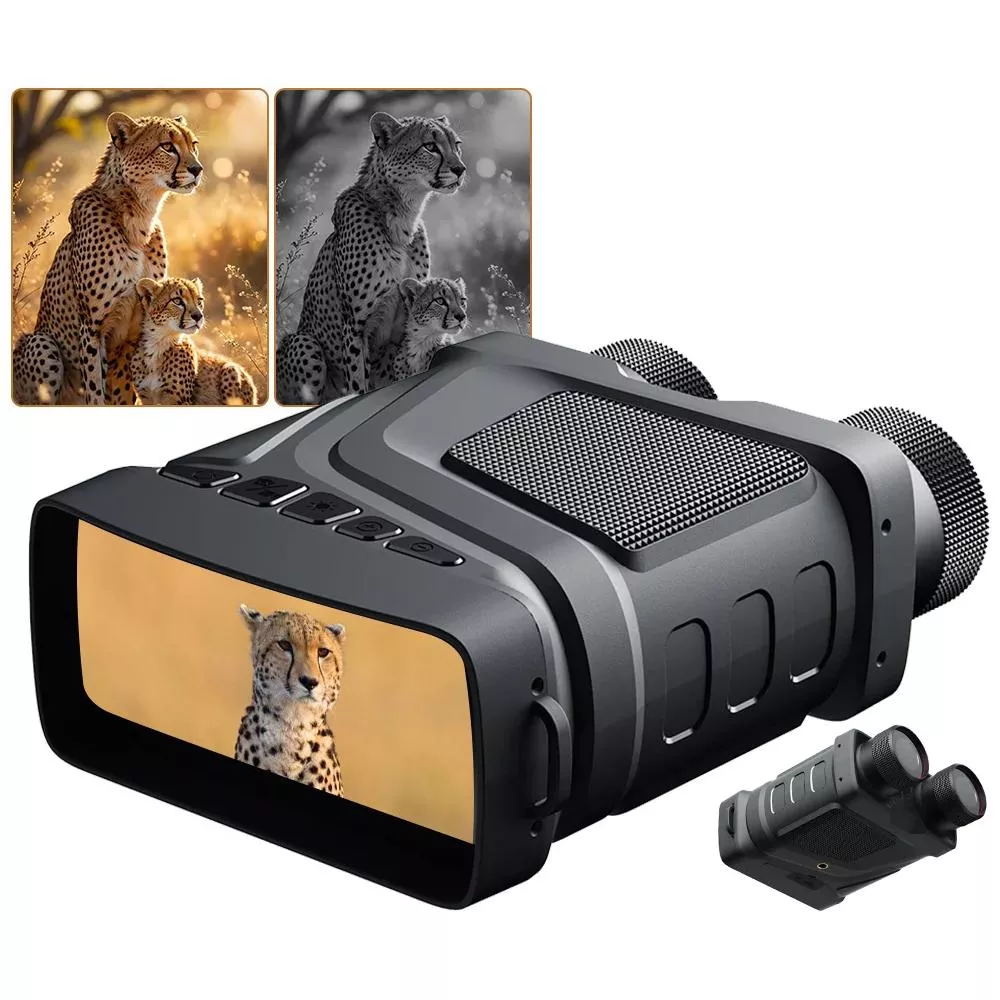
1080P Night Vision Binoculars with 5X Digital Zoom & Infrared Light: What to Expect After Dark
Nighttime viewing gets dramatically easier when a compact binocular-style device combines 1080P recording, digital zoom, and an infrared (IR) illuminator. Instead of relying on bright flashlights or guessing at shadows, digital night vision helps reveal motion, outlines, and terrain details when ambient light is minimal. The result is a practical tool for wildlife watching, quick property checks, camping tasks, and low-light navigation support.
If you’re shopping for an accessible way to see and record what’s happening after sunset, the 1080P Night Vision Binoculars with 5X Digital Zoom & Infrared Light are designed to balance convenience with real-world nighttime usefulness—especially when paired with steady handling and realistic range expectations.
What These Night Vision Binoculars Are Built For
Digital night vision binoculars like these are made to help you observe in conditions where the naked eye struggles. Instead of amplifying tiny amounts of available light the way traditional tube-based night vision does, digital systems typically rely on a sensor plus an IR illuminator that lights up a scene in infrared (invisible to people).
- Night observation without visible light: The IR illuminator helps reveal shapes and movement when it’s too dark to see naturally.
- Capturing what is seen: 1080P video and photo capability supports recording and reviewing details later.
- Zooming in for detail: 5X digital zoom enlarges distant subjects when moving closer isn’t practical (like across a field or down a driveway).
- Common use cases: Backyard wildlife near feeders, night hiking rest stops, checking property lines, camping setup after dark, and scanning trails for animals.
Core Features That Matter in Real Darkness
Specs are helpful, but performance after dark is shaped by how the features work together—especially IR brightness, distance, and how steady you can hold the device.
- 1080P recording: Useful for identifying objects and saving evidence or memorable moments; clarity depends on IR level, distance, and steadiness.
- 5X digital zoom: Enlarges the image digitally; best paired with a steady grip or tripod to reduce shake.
- Infrared light: Enables viewing in low/no-light conditions; higher IR power generally extends usable viewing distance but can increase battery use.
- Digital night vision vs. traditional: Digital night vision relies on a sensor and IR illumination rather than an image intensifier tube, often making it more budget-friendly. For a straightforward explanation of the technology, see How Night Vision Works.
Quick Feature-to-Benefit Map
| Feature | Why it helps | Best practice tip |
|---|---|---|
| 1080P video/photo | Captures clearer clips and stills for review | Hold steady; record short clips to reduce blur and file size |
| 5X digital zoom | Brings distant targets closer in frame | Zoom gradually; use support to prevent hand-shake |
| IR illuminator | Makes scenes visible without visible light | Start at a lower IR setting, increase only as needed |
| Binocular-style body | Easier aiming and extended viewing sessions | Use a neck strap and pause to rest your arms |
Performance Expectations: Distance, Clarity, and Conditions
Night vision range isn’t a single number that always holds true. Terrain, moisture in the air, and reflective objects can all change what you see.
- Distance varies by environment: Open areas generally allow longer visibility than dense woods, where IR light can be blocked or scattered by branches.
- Reflective surfaces: Eyeshine from animals and reflective signs can appear extremely bright; lowering IR intensity often restores detail.
- Weather effects: Fog, heavy humidity, and rain can reduce effective range by scattering IR light. For background on infrared behavior, NASA’s overview of infrared in remote sensing is a useful reference.
- Stability matters: Digital zoom magnifies hand movement; bracing elbows or using a tripod can noticeably improve sharpness.
How to Use for Clearer Viewing and Better Recordings
A few simple habits can make night viewing look cleaner and recordings more useful when you review them later.
- Start with focus and framing: Find the subject at no zoom first. Once centered and stable, increase zoom to inspect details.
- Tune IR brightness: Use the lowest IR level that gives enough visibility to preserve battery and reduce glare on nearby objects.
- Avoid backscatter: If you notice bright “sparkles” from dust, insects, or mist, lower IR intensity or shift your angle slightly to reduce reflected IR.
- Reduce motion blur: Hold the device firmly against your face, brace against a tree or post, or rest your arms on a stable surface for video.
- Plan for power: Longer sessions (camping nights, wildlife sits, or perimeter checks) are easier with spare batteries or a compatible power option if supported.
Practical Scenarios: Where It Shines
These binoculars are most satisfying when used for the kinds of moments that are normally “too dark to confirm” without turning on visible lights.
Care, Storage, and Safety Notes
Product Snapshot: 1080P Night Vision Binoculars with 5X Digital Zoom & Infrared Light
At-a-Glance Details
| Item | Details |
|---|---|
| Product | 1080P Night Vision Binoculars with 5X Digital Zoom & Infrared Light |
| Price | 51.51 USD |
| Availability | In stock |
More In-Stock Picks
FAQ
Can these binoculars work in complete darkness?
Yes. With the infrared illuminator enabled, the device can show scenes in very low light or complete darkness, though usable distance depends on IR level, how reflective the scene is, and conditions like fog or heavy tree cover.
Does 5X digital zoom make the image clearer?
Digital zoom makes the subject larger in the frame, but it doesn’t add optical detail the way true optical zoom does. It can also reveal more noise and magnify shake, so bracing your arms or using a stable support helps.
Why does the picture look washed out or too bright at close range?
Nearby objects can reflect infrared light strongly, causing glare and a “white-out” effect. Lower the IR brightness, change your viewing angle slightly, or step back to reduce reflections and recover detail.













Leave a comment