

Compact Z-Shaped Computer Desk for Small Spaces
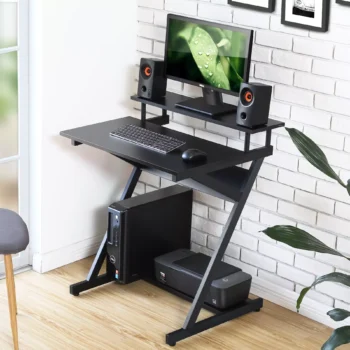
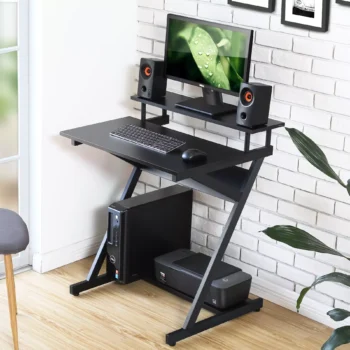
A dedicated workspace doesn’t have to take over your home. With a compact desk, you can give your laptop, monitor, and everyday supplies a place to belong while leaving the rest of the room available for everything else. Our Compact Modern Z-Shaped Computer Desk with Monitor Shelf for Small Spaces offers a modern option for a bedroom corner, apartment living area, or other spot where you want to settle in and focus.
Its Z-shaped design brings a contemporary look to the room, while the monitor shelf gives your screen a designated place. Before you choose a spot, take a few minutes to plan around your equipment, chair, and daily routine.
Make Room for Work
A separate office can be convenient, but it isn’t a requirement for getting organized. A desk can help define a work or study area within a room you already use. You might place it near a bedroom wall, create a workspace at one end of your living room, or use an available corner in a shared space.
Start by considering how you use the room throughout the day. If you work from home, look for a location that gives you enough separation from household activity to concentrate. If the desk is mainly for studying or occasional tasks, a quieter corner with access to lighting and power may be all you need.
Measure the available area before ordering, then compare it with the product dimensions. Remember to account for more than the desk itself: you’ll also need room to pull out your chair, sit down, and move around comfortably. Keep doorways and frequently used paths clear so your workspace fits naturally into the room.
A Modern Shape with a Monitor Shelf
The desk’s Z-shaped design gives it a distinctive, contemporary profile. It can serve as a visual anchor for your workspace without requiring you to create an elaborate home office. Pair it with a chair and accessories that suit your room, whether your surroundings are simple and neutral or filled with color.
The monitor shelf provides a designated place for a screen, helping you plan where your main display will sit. Before setting up, consider the size of your monitor and the height at which you’ll view it. A comfortable arrangement matters more than placing the screen on the shelf simply because the shelf is there.
Think about the other items you use regularly, too. A keyboard, mouse, notebook, or task light may all need a place within reach. Planning their positions ahead of time can help you decide whether the desk and your equipment will work together in your chosen space.
Plan a Comfortable Setup
Once you’ve found a location, arrange your equipment around your body rather than forcing yourself to adapt to an awkward layout. A useful starting point is to position the monitor so the top of the screen is at or slightly below eye level. You should be able to look at your work without repeatedly bending or turning your neck.
Keep your keyboard and mouse within comfortable reach, with enough room to use them without stretching forward. Choose a chair that supports a relaxed posture, and check that it fits at the desk and can move freely in the surrounding space. Your setup may need small adjustments as you settle into a workday.
For more guidance on arranging a computer workspace, see the OSHA Computer Workstations eTool. It covers workstation components and offers considerations you can apply to your own routine.
Workspace Planning Checklist
| Consideration | What to check |
|---|---|
| Room | Measure the intended area and allow space for the chair. |
| Monitor | Check that the screen fits and can be viewed comfortably. |
| Accessories | Plan accessible positions for the keyboard, mouse, and essential items. |
| Power | Locate nearby outlets and keep cables clear of walkways. |
Keep Your Work Area Simple
A compact workspace is easier to use when the items on it have a purpose. Keep frequently used supplies, such as a notebook or pen, close at hand. Supplies you reach for only occasionally can live elsewhere, leaving more room for the tasks in front of you.
Arrange cables neatly so they don’t obstruct movement or make outlets difficult to access. As you add or remove equipment, revisit the layout rather than letting cords accumulate across the floor. A few minutes spent tidying at the end of the day can also make it easier to return to work the next morning.
Your needs may change over time. If you start using a different monitor, spend more hours at the desk, or share the space with someone else, adjust the arrangement accordingly. Our team recommends treating your setup as something you can refine, not a fixed plan you have to get perfect on day one.
Explore the Desk
Ready to make a little room for work? Explore our Compact Modern Z-Shaped Computer Desk with Monitor Shelf. It is listed at $229.99 and is in stock; price and availability may change.
While you’re browsing, you can also explore our in-stock autumn women’s coat for days when your plans take you away from your desk.
FAQ
Is this desk suitable for a small room?
The desk is described as compact and intended for small spaces. Measure your intended area and compare it with the product dimensions before ordering, allowing room for your chair and movement.
What is the monitor shelf used for?
The shelf provides a designated place for a monitor. Check that your screen fits and sits at a comfortable viewing height.
How should a computer desk be arranged for comfort?
Position the screen at a comfortable viewing height, keep the keyboard and mouse within easy reach, and use a chair that supports a relaxed posture.













Leave a comment