

Rechargeable UHF Wireless Mic + Receiver for Karaoke
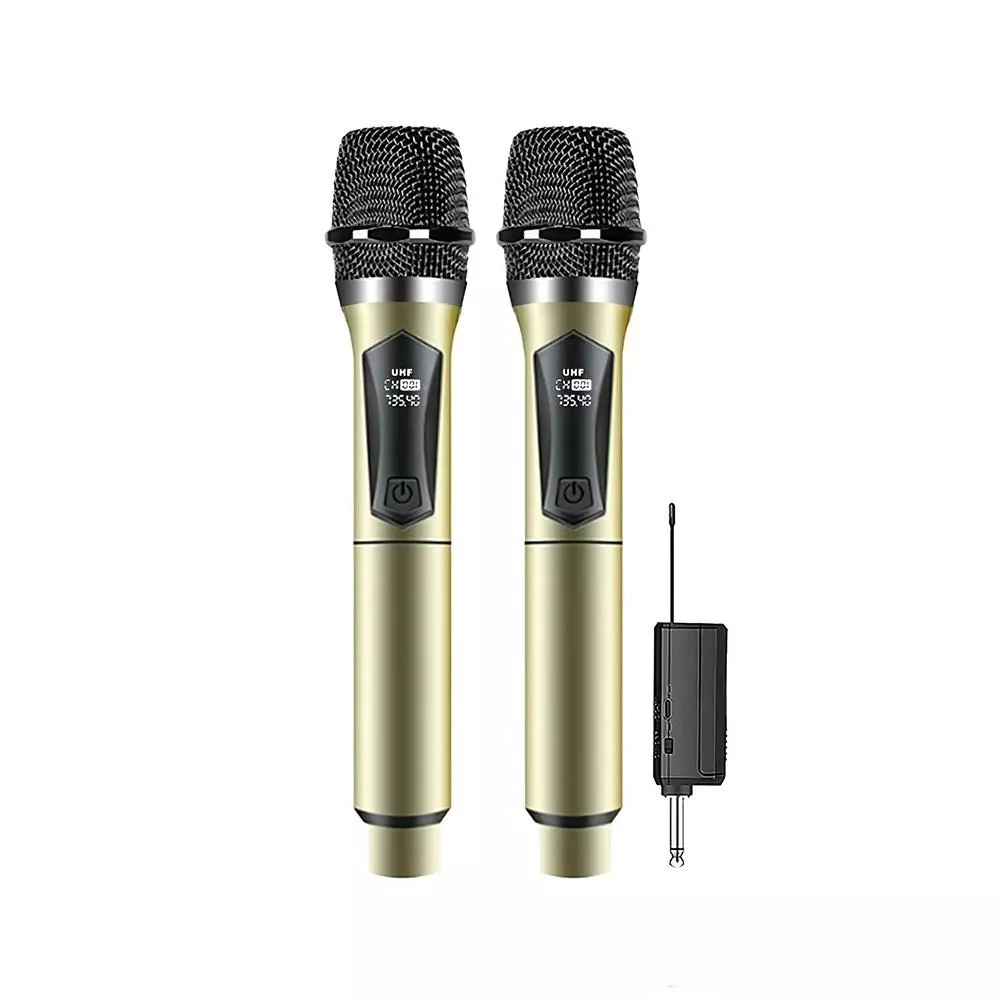
Wireless Rechargeable Handheld UHF Microphone with Receiver for Karaoke and Meetings
A handheld wireless mic can make karaoke nights louder and meetings clearer—without tangled cables or constant battery swaps. A rechargeable UHF-style set pairs a handheld microphone with a compact receiver to keep setup simple, improve signal stability, and stay easy to carry for home singing, small events, classrooms, and presentations.
At a Glance
- Handheld wireless mic + receiver for quick plug-and-play use
- Rechargeable design for repeat sessions without disposable batteries
- UHF-style wireless performance for improved stability versus many basic analog wireless options
- Useful for karaoke, announcements, small rooms, and casual events
| Item | What to confirm before use | Why it matters |
|---|---|---|
| Receiver connection | Match the receiver output to your speaker/amp/mixer input | Prevents low volume, distortion, or no sound |
| Charging status | Charge the mic (and receiver if applicable) before long sessions | Avoids dropouts mid-song or mid-presentation |
| Distance & line of sight | Keep a clear path between mic and receiver when possible | Improves reliability and reduces interference |
| Volume gain staging | Start low, raise receiver/amp gain gradually | Reduces feedback and clipping |
What Comes in the Set
- Handheld wireless microphone (rechargeable)
- Wireless receiver (connects to a speaker, amplifier, mixer, or compatible audio device)
- Charging cable and any included adapters (varies by package)
- Basic operating flow: power on, connect receiver, set volume, and test
Before the first use, confirm the receiver’s plug type matches the input on your powered speaker, karaoke machine, or mixer. If your system uses a different connector, a simple adapter can usually bridge the gap.
Why UHF Wireless Helps in Real Rooms
UHF wireless is widely used for microphones because it can deliver cleaner, more consistent performance than many entry-level wireless solutions—especially when you’re moving around, handing the mic to friends, or speaking from different positions in a room. In practical terms, that often means fewer surprise crackles, less “fading” when you turn your head, and better stability at typical living-room or small-venue distances.
That said, any wireless system benefits from smart placement. Thick walls, crowded electronics, and metal obstacles can all reduce reliability. If you’re in a shared environment (apartments, community rooms, multi-purpose halls), a small change—like shifting the receiver away from a TV, Wi‑Fi router, or a metal rack—can make a noticeable difference. For more background on interference basics, the FCC overview is a helpful starting point: Federal Communications Commission (FCC) – Wireless Devices and Interference.
Rechargeable Convenience for Karaoke and Meetings
Rechargeable operation is a quality-of-life upgrade for anyone who uses a mic more than once in a while. Instead of keeping spare disposables on hand, you can top up between sessions and be ready for spontaneous karaoke, a quick team huddle, or a last-minute announcement.
- Reduces ongoing cost versus disposable batteries for frequent use
- Great for short daily standups, weekend karaoke, and occasional community events
- Charging between uses keeps the mic ready without scrambling for replacements
- For longer events, plan charge time and keep a backup charging option available
Setup in Minutes
- Connect the receiver to the audio input of a powered speaker, amplifier, mixer, or karaoke machine (use the appropriate input type and adapter if needed).
- Power on the receiver, then power on the microphone and allow it to link.
- Start with lower volume on the speaker/amp, then raise gradually while speaking or singing at normal loudness.
- If feedback occurs, lower volume first, then increase distance from speakers and avoid aiming the mic directly at the speaker.
If you’re using a mixer, keep the mic channel gain conservative at first. A steady, medium signal will sound clearer than a too-hot signal that clips and distorts when you hit louder notes.
Best Use Cases
- Karaoke at home: more freedom to move and fewer cable trip hazards.
- Small meetings: clearer voice projection when people sit farther from the speaker.
- Classrooms and training: easy to pass around for Q&A and group participation.
- Announcements and casual events: quick setup without bringing a full audio rack.
Sound and Clarity Tips
For a deeper (and practical) look at wireless mic fundamentals and coordination, this guide is a solid reference: Shure – Wireless Frequency Coordination and Basics.
Managing Range and Interference
Compatibility Notes
Care, Charging, and Storage
Product Option
Wireless Rechargeable Handheld UHF Microphone with Receiver for Karaoke and Meetings is a portable, rechargeable set designed for quick setup in casual karaoke and speaking scenarios. It’s a strong fit for home karaoke, small group meetings, classrooms, and general voice amplification when you want fewer cables and less battery hassle.
More In-Stock Picks
- Low Waist Cargo Pants — an everyday wardrobe staple with a streetwear edge.
- Baby Bathing Pillow — a helpful comfort add-on for bath time routines.
FAQ
Will this work with a powered speaker or karaoke machine?
Yes—so long as the receiver can plug into an available audio input on your powered speaker, amp, mixer, or karaoke machine. Check whether your device uses a 1/4-inch (6.35mm), 3.5mm aux, or another input, and use an adapter if needed.
How do you reduce squealing feedback during karaoke or speeches?
Lower the speaker or channel volume first, then add volume gradually. Keep the mic pointed away from speaker drivers, increase distance from the speakers, and place speakers in front of where the mic is being used whenever possible.
What causes audio dropouts on wireless microphones, and how can they be fixed?
Common causes include low battery, too much distance, walls/obstructions, and local wireless interference. Fully charge the mic, move the receiver to a higher or clearer spot, and reduce barriers between the mic and receiver to improve stability.











Leave a comment